How to Size a Home Battery for the Loads You Actually Need
A home battery backup can be a useful outage tool, but sizing is where many people get stuck. Too small, and the system may not run the loads you care about for long enough. Too large, and you may end up paying for capacity you do not actually need.
The good news is that you do not need to be an engineer to make a solid first estimate. A home battery backup size calculator is really just a way to organize three basic inputs: what you want to run, how long you want to run it, and how your home's electrical setup affects delivery.
This guide walks through that process step by step. You will identify critical loads, look at electrical panel capacity, use a calculator in a realistic way, and add a few sizing adjustments so your estimate is more useful when you start comparing systems or talking with installers.
Step 1: Identify Critical Loads for Backup
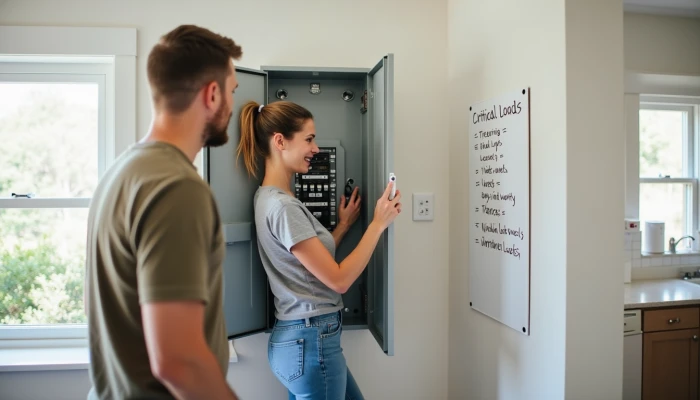
Start with the loads that matter most during an outage. In battery planning, these are usually called critical loads. They are the appliances and circuits you want to keep running even if the rest of the house goes dark.
For many homes, that list includes food storage, basic lighting, internet equipment, phone charging, and a few health or safety items. Depending on the property, it may also include a well pump, sump pump, garage door opener, or furnace blower.
A simple way to avoid oversizing is to separate "must-have" loads from "nice-to-have" loads.
- Usually critical: refrigerator, freezer, lights in key rooms, Wi-Fi router, modem, phone charging, medical equipment if applicable
- Sometimes critical: sump pump, well pump, furnace fan, boiler controls, microwave, a few outlets
- Often non-critical for basic backup: central air conditioning, electric water heating, electric ovens, dryers, large workshop tools, whole-home entertainment loads
If you are not sure what belongs on your list, think in terms of outage consequences. Ask yourself:
- What prevents food loss?
- What protects the home from damage?
- What supports communication and basic comfort?
- What must stay on overnight or through a multi-hour outage?
Next, estimate wattage. You can often find this on the appliance label, in the manual, or on an energy monitoring device if you have one. Some sizing guidance also uses typical ranges for common essentials, which can help as a rough starting point when exact labels are hard to find.
Use a worksheet like this before entering anything into a calculator.
| Load | Running watts | Hours used per day during outage | Daily watt-hours |
|---|---|---|---|
| Refrigerator | 150 | 8 equivalent runtime | 1,200 |
| Freezer | 120 | 8 equivalent runtime | 960 |
| Wi-Fi + modem | 20 | 24 | 480 |
| LED lights | 60 | 5 | 300 |
| Phone charging | 20 | 3 | 60 |
A key detail: some appliances cycle on and off rather than drawing full power all day. Refrigerators and freezers are common examples. That is why many battery sizing methods use a duty cycle assumption instead of multiplying full running watts by 24 hours.
This first step gives you the foundation for everything else. If your critical load list is unrealistic, the calculator result will be unrealistic too.
Step 2: Check Your Electrical Panel Capacity
After you know what you want to back up, the next question is whether your home's electrical system can support the way you want that backup delivered. This is where electrical panel capacity matters.
Battery size in kilowatt-hours tells you how much energy is stored. But your panel and backup equipment also affect how much power can be supplied at one time, which circuits can be backed up, and whether the system is set up for a few selected loads or broader home coverage.
In practical terms, panel-related limits can affect:
- How many circuits can be placed on backup
- Whether you need a critical loads subpanel or smart load controls
- Whether an older panel needs modification or replacement
- How much simultaneous power the system can deliver without tripping limits
This is one reason a battery that looks large on paper may still not behave like "whole-home backup." Large loads such as central air conditioners, electric resistance heat, or electric ranges can create power demands that exceed inverter or panel integration limits, even when the battery has enough stored energy for smaller circuits.
A quick homeowner-level check can help you prepare for installer conversations.
- Find your main service panel and note its service rating if clearly labeled
- Identify whether your home already has a subpanel for essential circuits
- List any large 240-volt loads you were hoping to back up
- Note the age of the panel if known
- Ask whether your backup goal is critical load backup or broader whole-home support
Do not treat this as a DIY electrical inspection. It is just a planning step. A licensed electrician or qualified installer should evaluate panel condition, available space, code requirements, and compatibility with the battery and inverter setup you are considering.
If a calculator asks only for energy use and ignores panel setup, treat the result as a rough estimate rather than a final system design.
Step 3: Use a Home Battery Backup Size Calculator
Now you can use a home battery backup size calculator in a way that reflects real household needs instead of guesswork.
Most calculators follow the same basic logic:
- Add up the loads you want to back up
- Estimate how many hours they will run during an outage
- Convert that into watt-hours or kilowatt-hours
- Adjust for inverter efficiency and usable battery capacity
- Compare the result with actual battery specifications
A simple formula looks like this.
Battery capacity needed (kWh) = Total daily watt-hours ÷ inverter efficiency ÷ 1,000
If your calculator works from average power instead of daily energy, it may use runtime directly.
Battery capacity needed (kWh) = Average load (kW) × backup hours ÷ efficiency
Here is a practical sequence to follow.
- Enter each critical load and its estimated running watts
- Enter realistic usage hours during an outage
- For cycling appliances, use estimated runtime rather than 24 full hours
- Apply inverter efficiency if the calculator does not already include it
- Look for usable battery capacity, not just nameplate capacity
Many battery systems do not make 100% of their rated capacity available for normal use. Some tools and manufacturer guidance distinguish between total capacity and usable capacity, which is the number that matters most for runtime planning.
This quick checklist can help you avoid common input mistakes.
| Calculator input | What to check |
|---|---|
| Wattage | Use running watts when possible, not marketing claims |
| Runtime | Estimate actual outage use, not normal-day use |
| Efficiency | If not built in, use the calculator's stated assumption or a conservative estimate |
| Capacity | Compare results to usable kWh, not just advertised kWh |
| Load scope | Confirm whether you are sizing for critical loads only or broader home backup |
Once you get a result, compare it with manufacturer sizing guidance and installer proposals. If your estimate says you need around 10 kWh usable and a quoted system offers 13.5 kWh usable, that may be a reasonable match. If your estimate says 20 kWh and the quote offers much less, ask what loads are expected to be excluded or controlled.
This is also the point where many homeowners answer the question, how much battery backup do I need. The honest answer is: enough usable capacity to support your chosen critical loads for your target outage duration, within the power limits of the system and your panel setup.
Step 4: Consider Key Sizing Factors
A calculator gives you a starting number. Good planning adds a few real-world adjustments.
The first is usable capacity and depth of discharge. Battery systems vary in how much of their rated energy is intended for regular use. Some guidance for lithium systems notes that usable capacity can be lower than total advertised capacity, and that preserving some reserve can support battery longevity and system management.
The second is duty cycle. Loads like refrigerators, freezers, and some pumps do not run continuously. If you assume they do, you may oversize the battery. If you assume too little runtime, you may undersize it. Conservative but realistic duty-cycle assumptions are often more helpful than trying to force precision from rough estimates.
The third is solar integration. If the battery will recharge from solar during outages or daily operation, sizing may look different than for a battery that must carry loads with no recharge source. Some manufacturer and installer guidance suggests comparing battery capacity with expected daily solar production rather than sizing the battery in isolation.
The fourth is safety margin. Real homes are messy. Usage changes, outage timing changes, and startup surges can complicate neat calculations. Adding a margin can help absorb those uncertainties.
A practical review list looks like this.
- Check whether the battery spec lists total capacity or usable capacity
- Revisit any loads with motors or compressors, such as a battery backup for refrigerator planning scenario
- Ask whether the inverter can handle startup surges for pumps and appliances
- Consider whether solar recharge changes your runtime expectations
- Add a modest planning buffer rather than sizing to the exact minimum
You can think of the final sizing process in three layers.
| Layer | What it answers |
|---|---|
| Load estimate | What do you want to run? |
| System limits | Can the inverter and panel support those loads? |
| Real-world buffer | What margin do you need for efficiency, cycling, and uncertainty? |
If your first-pass calculator result feels surprisingly small or large, that does not always mean the math is wrong. It may mean one of these factors has not been accounted for yet.
Conclusion
Sizing a battery for backup is less about finding a magic number and more about making a few clear decisions in the right order. First define your critical loads. Then check how your electrical panel capacity and backup design affect what is actually possible. After that, use a calculator to estimate usable capacity, and adjust for efficiency, duty cycle, solar recharge, and a reasonable margin.
That process will not replace a professional design, but it will help you ask better questions and spot unrealistic assumptions. Use your calculator result as a planning baseline, then verify the final system size, panel integration, and load coverage with a qualified installer or licensed electrician before you buy.