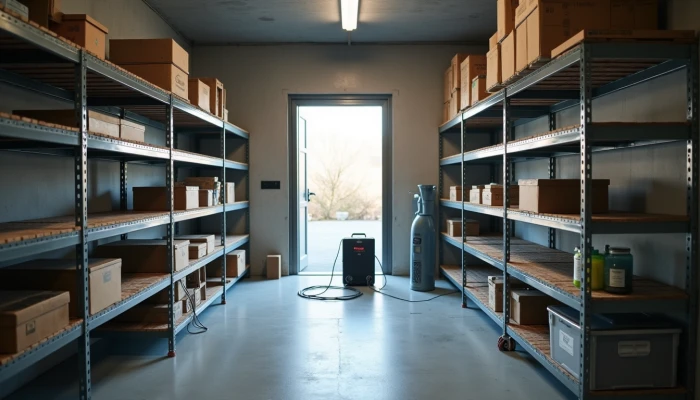
Keeping a Portable Power Station Reliable in Humid Weather
A portable power station can be a useful part of a home backup plan, especially for phones, lights, routers, small appliances, and other limited loads during an outage. But in humid climates, storage and day-to-day handling matter more than many buyers expect.
Moisture in the air can affect metal contacts, internal electronics, and long-term battery condition. That does not mean a unit becomes unusable in a coastal, tropical, or damp environment. It means you should treat humidity as one of the conditions that can reduce reliability if ignored.
The good news is that most of the protection steps are simple. If you store the unit at a moderate charge level, keep it in a dry and ventilated place, and avoid operating it where condensation or direct moisture is likely, you can reduce avoidable wear.
This guide focuses on practical care, not product hype. It explains humidity impact on batteries, storage best practices, and ventilation requirements so your portable power station is more likely to be ready when you need it.
Understanding Humidity's Impact on Battery Performance
Humidity mainly creates problems in two ways: moisture exposure and the side effects that come with it, such as corrosion, condensation, and heat retention.
For a portable power station, the battery cells are only part of the story. The unit also includes terminals, wiring, sensors, an inverter, charging circuits, and a battery management system. Even if the battery chemistry itself is fairly stable, moisture can still affect the parts around it.
Source-backed manufacturer guidance commonly warns that damp conditions can corrode external terminals and stress control electronics. Research on lithium-ion battery materials also shows that moisture can contribute to chemical reactions that harm performance over time. In plain terms, humidity may not cause immediate failure, but repeated exposure can make the unit age less gracefully.
A few common risks are worth watching:
- Corrosion on ports, plugs, and exposed metal contacts
- Condensation if a cool unit is moved into warm, damp air
- Reduced long-term reliability of internal circuitry
- Extra stress when humidity combines with poor ventilation and heat
Humidity is often most damaging when it is paired with neglect. For example, leaving a unit in a damp basement, garage corner, boat locker, or unconditioned shed for months is usually riskier than using it briefly indoors during a storm while keeping it dry and ventilated.
It also helps to separate realistic expectations from marketing language. A portable power station is not the same as a permanently installed whole-home battery backup system. It can be very useful for selected devices, but its reliability still depends on storage conditions, battery care, and staying within its rated limits.
If you are planning backup power for outages, think of humidity as one planning factor alongside battery size, runtime, and charging options. People often ask, "how much battery backup do I need," but the better question in a humid climate is two-part: how much capacity do I need, and where will I store it so that capacity is still there when the outage happens?
Storage Best Practices for Humid Environments
Good storage habits do more for battery life than occasional emergency use. If your unit spends most of the year waiting for outages, storage conditions may shape its long-term health more than anything else.
A practical baseline is to store the unit indoors in a clean, dry area with stable temperatures and decent airflow. Manufacturer guidance for lithium-based portable stations often recommends avoiding full charge or full discharge during long idle periods. For long-term storage, a moderate state of charge is commonly preferred.
Use this checklist before putting a unit away for weeks or months.
- Charge it to the manufacturer-recommended storage range, often around 30% to 60% state of charge if the manual says so
- Unplug accessories and cables
- Wipe the exterior dry and make sure ports are clean
- Store it off the floor if the area is prone to dampness
- Keep it away from plumbing leaks, windows that sweat, laundry rooms, and unventilated basements
- Add desiccant packets if the unit is kept in an enclosed case or cabinet, as long as that does not block airflow during use
- Check charge level on the schedule recommended by the manufacturer and top up if needed
The storage location matters as much as the charge level. A closet inside conditioned living space is usually safer than a shed, attic, or garage in a very humid region. If you have no choice but to use a less controlled space, focus on reducing direct moisture exposure and checking the unit more often.
This quick table can help you judge common storage spots.
| Storage spot | Humidity risk | Practical note |
|---|---|---|
| Indoor closet in conditioned space | Lower | Usually the safest simple option |
| Bedroom or hallway cabinet | Lower | Good if vents stay unobstructed |
| Garage | to high | Risk depends on climate, heat, and dampness |
| Basement | to high | Watch for musty air, condensation, and flooding risk |
| Shed or outdoor storage box | High | Usually a poor choice unless the manufacturer specifically supports the conditions |
| Vehicle trunk for long periods | High | Heat and humidity together can be hard on batteries |
Another useful habit is periodic inspection. Every so often, look for rust-colored marks on connectors, a musty smell, swelling, visible moisture, or error messages on the display. If anything looks off, stop using the unit until you can review the manual or contact the manufacturer.
If you are comparing home backup power options, storage practicality should be part of the decision. A unit that fits your energy needs but has no realistic dry storage location in your home may not be the most dependable choice. That is also why a home battery size calculator only solves part of the problem. Capacity matters, but so does where and how the equipment lives between outages.
Ventilation and Operational Precautions
When you are actively using a portable power station in humid weather, airflow becomes especially important. Batteries and inverters create heat during charging and discharging. If that heat cannot escape, internal temperatures can rise, and humidity can make the environment feel even less forgiving.
The basic rule is simple: operate the unit in a dry, well-ventilated area and keep its vents clear. Do not wrap it in blankets, shove it into a tight cabinet while running, or place it against curtains, bedding, or other materials that block airflow.
Follow these operating precautions.
- Set the unit on a stable, dry surface
- Leave space around the vents and fans
- Keep it out of direct rain, splashing water, and wet ground
- Avoid using it in steamy bathrooms, damp crawl spaces, or other enclosed wet areas
- Let a unit warm up gradually if it has been moved from an air-conditioned room into hot, humid air, which may reduce condensation risk
- Watch for fan behavior, warning lights, or temperature alerts during heavy use
Condensation deserves special attention. In humid climates, a cool device brought into warmer damp air can collect moisture on surfaces, including around ports and electronics. If you see visible condensation, do not rush to plug in loads or start charging. Let the unit dry and return to a stable condition first, following the manufacturer instructions.
Ventilation also affects charging. Fast charging can create more heat than light discharging. If you recharge the station after an outage, place it somewhere with open airflow rather than in a sealed cabinet or crowded corner.
Here is a simple mistake-to-avoid table.
| Situation | Why it is a problem | Safer approach |
|---|---|---|
| Running the unit in a closed closet | Heat buildup and poor airflow | Move it to an open, dry room |
| Using it near an open window during wind-driven rain | Moisture can reach vents and ports | Keep it farther inside and dry |
| Storing and using it in a damp basement corner | Ongoing moisture exposure | Relocate to a drier indoor area |
| Charging immediately after moving from cool AC to humid air | Condensation risk | Let it acclimate first |
| Covering the unit to hide fan noise | Blocks ventilation | Keep vents clear and use it in a better-ventilated spot |
If your backup plan needs to support larger household loads, remember the limits of this equipment category. A portable power station may help with selected essentials, but it is not automatically a substitute for a professionally designed backup system. For bigger resilience goals, it may make sense to compare portable equipment with other home backup power options and discuss permanent solutions with a qualified installer.
Finally, pay attention to the unit's own health indicators. Battery apps, displays, and warning codes can provide early signs of trouble. They are not perfect diagnostic tools, but they can tell you when the unit is overheating, charging abnormally, or behaving differently than usual. In humid conditions, that kind of early warning is useful.
Conclusion
Humidity does not mean you have to avoid a portable power station. It means you should be more deliberate about where you store it, how you operate it, and how often you check it.
The big takeaways are straightforward:
- Store the unit in a dry, ventilated indoor location
- Follow manufacturer guidance for long-term charge level
- Avoid damp spaces, direct moisture, and blocked vents during use
- Watch for condensation, corrosion, and warning indicators
Those habits can help preserve battery performance and improve the odds that your backup power is ready when an outage happens. For anything involving safety limits, charging behavior, or environmental ratings, the most conservative approach is to verify details with the manufacturer and, when needed, a qualified electrician or installer.