How to Choose a Battery Backup System That Fits Your Outage Needs
Choosing a battery backup system can feel harder than it should. Product pages often focus on big numbers, while installer quotes may assume you already know what capacity, output, or critical loads mean. The result is that many households struggle with the same question: how do you pick a system that will be useful during a real outage without paying for more than you need?
A good starting point is to think less about the battery itself and more about your home. The right setup depends on three things: which circuits matter most, how much energy those loads use, and whether your needs may grow later. That is the core of choosing a practical home battery backup.
This guide walks through a simple decision process. It does not promise that one battery size works for every home, and it does not assume you need whole-home backup. Instead, it helps you narrow the field before you talk with an electrician, installer, or manufacturer about final compatibility, code, and installation requirements.
Step 1: Identify Essential Circuits for Backup Power
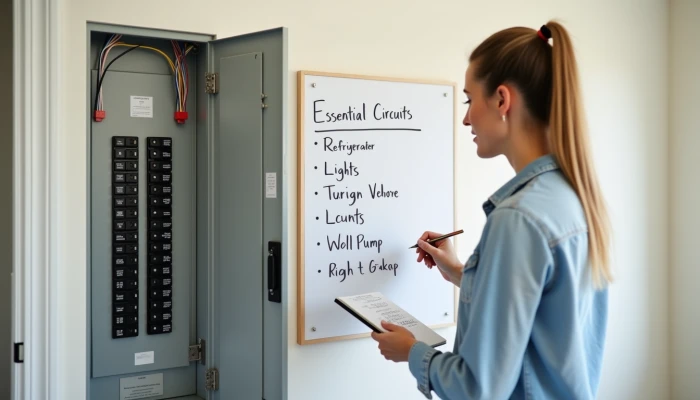
The first decision is not battery size. It is deciding what actually needs power during an outage.
Many homes do not need every circuit backed up. In fact, trying to support everything at once can push a system into a much larger and more expensive category. A more practical approach is to separate essential loads from nice-to-have loads.
Essential circuits usually support safety, food storage, water access, basic comfort, and communication. Depending on the home, that may include a refrigerator, freezer, internet equipment, a few lights, phone charging, a garage door opener, a furnace blower, a sump pump, or a well pump. Larger loads such as central air conditioning, electric resistance heat, ovens, dryers, or whole-home EV charging often require a much bigger system and may not make sense for every outage plan.
A useful way to sort circuits is this checklist.
- Must stay on: loads that protect health, food, water, or basic home function
- Helpful but optional: loads that improve comfort or convenience
- Usually not backed up first: heavy loads that quickly drain storage or exceed power limits
If you are unsure what is on each breaker, this is where professional help matters. An electrician can map your panel and identify which circuits are realistic candidates for a critical loads setup. That matters because some appliances that seem simple on paper may share circuits with other loads, and some homes are not laid out in a way that makes selective backup obvious.
It also helps to think in terms of outage scenarios rather than ideal conditions.
| Outage scenario | Backup priority |
|---|---|
| Short outage of a few hours | Fridge, lights, Wi-Fi, phone charging |
| Overnight outage | Add heating blower, medical-supporting household equipment if advised by professionals, security basics |
| Multi-day outage | Add water systems, freezer, selective cooking, recharge strategy |
This step keeps expectations realistic. For example, if your main concern is battery backup for refrigerator operation and a few household basics, you may not need a whole-home design. But if your home depends on a well pump or sump pump, your essential list may point toward a more robust system with higher output and careful circuit planning.
The goal is to leave this step with a written list of essential circuits, not a vague idea that you want "backup for the house." That list becomes the basis for sizing and comparing systems.
Step 2: Calculate Household Energy Load and Runtime Requirements
Once you know what you want to power, the next question is: how much battery backup do I need?
That answer comes from two separate numbers:
- Power output (kW): how many things you can run at the same time
- Energy capacity (kWh): how long you can run them
This distinction is easy to miss. A system might have enough stored energy to run a refrigerator for many hours, but still not have enough output to start several larger appliances at once.
Start with a simple load worksheet.
| Appliance or circuit | Running watts | Hours used per day during outage | Daily energy (Wh) |
|---|---|---|---|
| Refrigerator | |||
| Wi-Fi/router | |||
| Lights | |||
| Phone charging | |||
| Furnace blower / sump pump / well pump | |||
| Other essential load |
To estimate daily energy, use this formula.
Watt-hours = watts × hours of use
Then convert watt-hours to kilowatt-hours by dividing by 1,000.
kWh = Wh ÷ 1,000
For example, if a device uses 100 watts for 10 hours, that equals 1,000 Wh, or 1 kWh. Add the totals for all essential loads to estimate how much energy you want available over a day.
There are two common mistakes here.
- Using nameplate wattage as if the appliance runs at that level all day
- Ignoring startup surges or times when several loads overlap
Motors and compressors matter most. A refrigerator, well pump, sump pump, or furnace blower may draw more power at startup than during normal operation. That is one reason manufacturer specifications and installer review are important. Runtime math alone does not tell you whether a battery system can handle those short bursts.
Season also changes the answer. A winter outage may increase heating-related loads. A summer outage may raise cooling needs or refrigerator cycling. If your home office, internet equipment, or EV charging habits are part of daily life, include them only if they are truly essential during an outage.
If you want a simple planning sequence, use this.
- List essential circuits only.
- Find typical running watts from labels, manuals, or manufacturer documentation.
- Estimate how many hours each load would run during an outage day.
- Add the daily kWh total.
- Check whether several loads may run at the same time.
- Compare both energy capacity and output rating when reviewing systems.
If you prefer a home battery size calculator, treat it as a starting point rather than a final answer. Calculators can help organize loads, but they may not capture panel layout, surge demands, or how your home behaves in different seasons.
This is also the point where you should decide on a runtime goal. Some households want enough storage to ride through brief outages without interruption. Others want to cover overnight use, or to stretch through longer outages with careful load management. A battery sized for six hours of essentials is a different purchase from one meant to support selective loads across a day or more.
The key is to match the system to a realistic outage plan, not to a marketing promise. A smaller, well-matched system can be more useful than a larger one chosen without a clear load calculation.
Step 3: Evaluate System Scalability and Future-Proofing
After you know your current essential loads, look at how your needs may change. This is where system scalability matters.
Some battery systems are modular, meaning capacity can be expanded later by adding compatible battery units. That can be useful if you want to start with essential circuit backup now and consider more runtime, solar charging, or additional loads later. Other systems are less flexible and may require a larger upfront commitment.
Scalability is not only about adding more kWh. It also includes whether the system can support future changes such as:
- Solar integration
- A larger critical loads panel
- Higher household electricity use
- EV ownership or future bidirectional charging options
- More detailed monitoring and load control
A practical way to compare options is to score them on a few planning questions.
| Question | Why it matters |
|---|---|
| Can capacity be expanded later? | Helps avoid replacing the whole system if needs grow |
| Is the output enough for your priority loads? | More storage does not help if the system cannot run key loads together |
| Can it work with solar now or later? | Useful for longer outages and broader energy planning |
| Does it support critical-load management? | Helps preserve runtime by prioritizing essentials |
| Is monitoring available? | Makes it easier to understand usage and battery performance |
Future-proofing does not mean buying the biggest system you can afford. It means avoiding dead ends.
For example, if you expect to add an EV, convert a room into a home office, or install solar later, ask whether the system can grow with those plans. If not, a lower initial price may be less attractive over time. On the other hand, if your goal is simply to keep food cold, stay connected, and run a few lights during occasional outages, a simpler system may be the better fit.
This is also where whole-home backup needs a reality check. Some households can support most of the home with a large battery system, but that does not mean every home should aim for that. Large homes, electric heating, central air, and other heavy loads can push storage needs much higher. In those cases, implementation guidance commonly emphasizes realistic load analysis and selective backup rather than assuming one battery can cover everything.
When you compare proposals, ask each provider to explain three things in plain language.
- What loads the system is designed to support
- For roughly how long under typical outage use
- What can be expanded later without replacing major components
Those answers are often more useful than a headline capacity number alone.
A scalable system is not automatically the right system. But if your energy use may change, flexibility can reduce the chance that today's purchase becomes tomorrow's limitation.
Conclusion
Choosing a battery backup system gets easier when you break the decision into three steps: identify essential circuits, calculate the load and runtime you actually need, and check whether the system can grow with your home.
That approach helps you avoid two common problems: overspending on backup you may never use, or undersizing a system that cannot support your priority loads during a real outage. It also keeps the conversation grounded in practical questions instead of broad claims about whole-home power.
If you take one thing from this guide, let it be this: the right system is the one that matches your essential loads and outage goals with clear limits and room for sensible expansion. Before buying, confirm final sizing, circuit selection, installation requirements, and compatibility with a qualified electrician, installer, manufacturer, and any local authority that applies.